Plazmapunk turns any track into trippy motion, but its free tier squeezes you into 4:3, caps resolution at 720 p, and stamps every frame with a logo.
If you want clean 4 K visuals that hit on every snare without paying studio rates, consider these seven AI video generators instead. We ranked them by image clarity, watermark policy, price, creative control, and real-user feedback so you can showcase your next single without compromise.
How we ranked these alternatives
We scored each platform out of ten in five areas that matter to working musicians.
- Video quality (30 percent). We checked the current maximum resolution and watched real exports on a 4 K monitor.
- Watermark policy (20 percent). If a paid download shows a logo, the score drops. Free-tier marks matter less because they are for testing.
- Pricing flexibility (20 percent). We balanced monthly cost against the value you receive—credits, minutes, or unlimited use.
- Creative control and audio-reactivity (15 percent). Tools that sync cuts to a snare hit or let you tweak prompts beat one-click “surprise me” apps.
- Community feedback (15 percent). We read Reddit threads, Discord chats, and G2 reviews to learn how these tools perform beyond marketing pages.
The weighted totals create the leaderboard below. If price matters more than polish, reorder the shortlist to match your goals; our framework simply keeps the process transparent.
1. Neural Frames
Neural Frames can make your track look as if it left an A-list post house. The neuralframes engine listens to each stem (kick, snare, vocal, bass), moves the picture in perfect time, and now powers 40,000+ artists’ true-4 K, watermark-free exports. A cymbal swell bursts into particles, while a vocal pause drifts the camera. The sync feels intentional because it is.
Quality leads the feature set. Paid tiers export true 4 K video, so a YouTube premiere stays sharp on a 65-inch screen. Once you subscribe, the watermark disappears. That polish keeps indie labels in the user list even at a slightly higher price.
Power users love the control panel. Stay in Autopilot and let the AI choreograph everything, or open Frame-by-Frame to adjust prompts, camera moves, and color grades scene by scene. Need a steady look across an album cycle? Train a custom model on your band’s artwork and reuse it for every release.
The trade-off is time. Large files still take time to render, yet Autopilot mode usually finishes a full 4 K clip in under ten minutes and the Turbo preview toggle renders drafts roughly four times faster, according to Neuralframes.com; the interface itself keeps a short learning curve. Once it clicks, Neural Frames provides cinematic swagger that lets a bedroom producer compete with a major label.
2. Freebeat
Freebeat acts like a video editor that works in milliseconds. It analyzes your track before drawing a pixel, mapping BPM, beat markers, and each verse or chorus. When the chorus lands, the camera goes wide. When the bridge softens, the cuts slow. The video breathes with your arrangement because the engine understands musical structure.
Freebeat AI music video generator beat-synced editor screenshot
That timing drives three creation lanes. Storytelling Mode plots a mini-film that follows lyrical mood. Singing Mode imitates a concert director with close-ups, light sweeps, and quick cuts. Automatic Mode is the wildcard: click once and receive a full cut. Switching modes changes pace and shot logic, not just color, so an indie folk ballad will never look like a club anthem.
Visual identity stays consistent. Upload one reference photo and Freebeat locks the avatar’s face from every angle, then syncs lips with about 90 percent accuracy for the full song. For solo acts, that steadiness shifts the result from “AI test” to a replay-worthy video.
The trade-off is resolution. Exports reach 1080 p today, with 4 K listed as coming soon, and queues lengthen around Friday release rush hours. If you value speed and beat-perfect edits over raw pixels, Freebeat is a dependable co-director that keeps the groove.
3. Kaiber
Kaiber blends AI art with music video creation, closer to animated paintings than live footage. Drop your track, pick a visual theme such as space opera, neon noir, or hand-drawn anime, and Kaiber builds the concept in minutes. Four scene previews appear first, so you do not waste credits on an off-brand look.
Kaiber AI music video style themes for animated music videos
Its edge is imagery. Upload an album cover and watch it melt, morph, and reassemble in rhythm. Provide a text prompt and Kaiber spawns surreal landscapes that match the song’s energy. The result feels like a film montage, perfect for genres that favor atmosphere, including synthwave, lofi, and cinematic electronica.
Ease comes with limits. Exports top out at 1080 p, and audio-reactivity relies on broad energy detection rather than frame-accurate edits. If you value style over sync and need speed on a budget, with entry plans near ten dollars, Kaiber offers a quick route to striking visuals.
In short, Kaiber supplies an arty, animated backdrop in less time than it takes to brew coffee. It may miss a few snare hits, but it keeps eyes on the screen.
4. VibeMV
VibeMV tackles a familiar complaint: “My AI video looks great, yet the cuts miss the beat.” The tool acts like an assistant editor focused on timing. It scans the waveform, tags each verse, chorus, and bridge, then cuts scenes so every segment lands cleanly. The result feels intentionally edited, not random.
VibeMV AI music video generator waveform and avatar storyboard UI
One highlight is the built-in performer. Upload one selfie and VibeMV generates a virtual singer whose face and mouth track your vocals. No awkward jumps between shots, no drifting jawlines. If your music relies on personality, such as rap verses or soulful belts, watching an avatar match every word grabs attention.
VibeMV’s storyboard system also lightens creative load. The AI drafts a text description for each scene based on your song’s emotional arc. Accept the script or tweak prompts to shift color palettes, camera moves, and style references. Cohesion stays tight because the engine reuses the same character and art direction throughout.
The trade-off is resolution. Exports top out at 1440 p, and because the process is automatic, prompt-by-prompt control is limited compared with pro editors like Neural Frames. For indie artists who need a polished, beat-synced clip without opening Premiere, VibeMV turns one upload into a stage-ready video.
5. WZRD
Sometimes you need moving art that syncs to the beat with almost no setup. WZRD fits that need. Upload your song, choose a theme, and click render. Minutes later you see a psychedelic tunnel pulsing with the kick or a watercolor galaxy blooming with the bass.
Real-time audio analysis tracks percussion spikes and harmonic shifts, then feeds that data into the visual engine so color bursts, shape shifts, and camera moves follow the rhythm. The sync is looser than frame-by-frame editors yet tighter than generic visualizers.
Visual variety stays focused by design. About a dozen themes cover fractals, liquid paint, cosmic dust, and glitch art. You cannot script scenes or add text, but that restraint keeps renders quick and uncluttered. WZRD works well as background motion for live streams, DJ sets, or a quick YouTube upload when album art feels static.
Know the limits. Exports reach 1080 p, and the paid tier is required to remove the watermark. Narrative control is minimal; WZRD sets a mood rather than a story. For producers who need instant, beat-sensitive graphics without opening a manual, it meets the brief.
6. BeatViz
BeatViz is a playground for power users. Instead of locking you to one AI model, it lets you stack and blend several models such as Kling (crisp realism), Veo (dreamy diffusion), and Seedance (fluid motion). Picture a modular synth for video: choose the engines, adjust more than twenty settings including camera speed, particle density, and color temperature, and watch the system merge them into one cut that stays on your tempo grid.
BeatViz multi-model AI music video generator advanced controls
Professional ambition shows in the specs. Select 4 K in the export menu and BeatViz delivers even on five-minute tracks. The price sits above hobby tools, and large renders queue for processing, yet the outcome is broadcast-ready clarity. Labels planning a Spotify premiere treat the surcharge as cheap insurance against pixel blur.
The built-in AI director chat is another highlight. Type a prompt like “open with a slow dolly shot through neon rain, then cut to an aerial at the beat drop” and the app rewrites the storyboard in seconds. Lyric captions, vertical formats, and multi-language menus round out a toolbox aimed at artists with global audiences.
BeatViz does demand patience. Fine-tuning parameters can consume time, and a laptop fan will spin while high-fidelity previews load. If you want surgical control and true 4 K output, few platforms offer more ways to shape motion to music.
7. Rotor Videos (bonus non-AI pick)
AI visuals can dazzle, yet sometimes you need a reliable option that ships today. Rotor fills that gap. Instead of generating frames from scratch, it draws on a large library of licensed footage such as urban skylines, abstract light leaks, and vintage film grain, then auto-cuts the clips to your track’s peaks and transitions.
The workflow is simple. Upload the song, pick a style pack, and Rotor drafts an edit in minutes with smooth transitions and balanced color. You can swap individual shots or add your own B-roll, but most users click render and move on. Because the footage is pre-shot, exports reach true 4 K without stretching AI frames, and paid renders stay watermark-free.
Rotor does have creative limits. You will not produce dragon-riding cyborgs or neon anime worlds; the clip library defines the palette. Videos may feel stock if you rely only on built-in footage, so adding custom shots or lyric overlays helps personalise the result.
For artists on a deadline who value dependability over experimentation, Rotor remains a trusted workhorse. It turns a static image release into a polished video ready for YouTube, TikTok, or the venue projector.
Quick-glance feature comparison
Seven tools, seven personalities. Before you jump back into demos, here is a side-by-side look at the specs musicians ask about first. Scan the grid, note the row that fits your priorities, then keep experimenting.
| Tool | Max resolution | Watermark on paid? | Free test run | Stand-out strength |
| Neural Frames | 4 K (AI-upscaled) | None | Trial (watermarked) | Deep audio reactivity, frame-level control |
| Freebeat | 1080 p (4 K in dev) | None | Short credit allotment | Beat-perfect shot planning, avatar lip-sync |
| Kaiber | 1080 p | None | Limited credits | Rich artistic styles, fastest setup |
| VibeMV | 1440 p | None | 50 credits | Storyboard plus consistent singing avatars |
| WZRD | 1080 p | None | Small previews | One-click psychedelic themes for live loops |
| BeatViz | 4 K | None | 20 credits (720 p) | Multi-model fusion and 20-plus tweak dials |
| Rotor Videos | 4 K | None | Preview only | Stock-footage editor that never glitches |
Prices and policies shift often in the AI space, so confirm the latest limits before planning a release cycle.
Conclusion
Still unsure where to start? Use this plain-language guide.
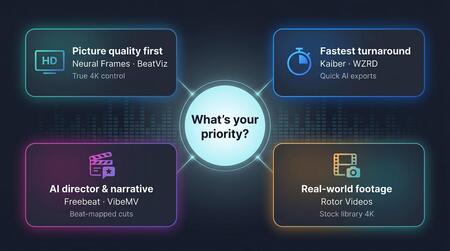
If picture quality matters most, choose Neural Frames or BeatViz. Both export true 4 K and provide granular control, so you can grade or re-cut later without pixel blur.
When speed is the top priority, Kaiber and WZRD deliver fast results. You will trade some sync accuracy and resolution, yet a share-worthy clip lands before you finish writing the caption.
Prefer an AI director that plans every cut? Freebeat and VibeMV focus on narrative timing, lip-sync, and beat-mapped edits. They suit creators who want performance energy without hiring a camera crew.
Keep Rotor ready for tight deadlines or genres that call for real-world footage. The stock library renders clean 4 K with no AI surprises.