
Your team has a working prototype, a few screenshots, and five minutes to explain what you built. The code may be ready, but the presentation is still a collection of unfinished slides. AI PPT Maker can help turn project notes into a draft that gives the demonstration a clear purpose.
For an internal hackathon or innovation showcase, the audience needs to understand more than the technology. They need to see the problem, what your prototype demonstrates, and why it deserves further attention.
That is difficult when you have spent the last two days inside the project. Details that seem obvious to your team may be unfamiliar to everyone watching.
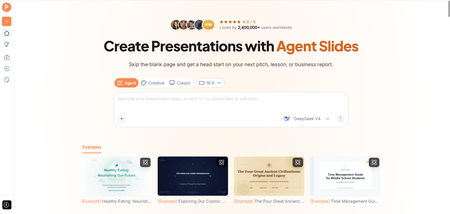
(Create presentations with AI PPT Maker)
Open with the Moment That Made You Build It
A prototype becomes easier to understand when the audience recognizes the situation behind it.
Perhaps colleagues repeatedly search several systems for the same information. Perhaps a routine request passes through too many people. Start with that moment rather than a list of technologies.
Write a short description of what currently happens and why it creates difficulty. Give AI PPT Maker that explanation alongside your project notes.
The opening should establish the problem quickly enough that the demonstration has meaning.
Keep the Problem Small Enough to Show
A hackathon project rarely solves every aspect of a broad organizational problem.
If your prototype handles one step in a larger workflow, say so. That makes the demonstration easier to assess.
For example, a tool that organizes incoming requests may not resolve them automatically. Your presentation should explain the part you built without extending its capabilities.
Ask AI PPT Maker to keep the scope consistent with your notes. Check that concise wording has not turned a narrow demonstration into a sweeping claim.
Decide What the Audience Should Notice in the Demo
A live demonstration can become a tour of buttons if you have not chosen the point it needs to prove.
Identify one or two moments that show the prototype’s value. Explain what goes in, what happens, and what the audience should observe.
You might show a sample request entering the system and becoming easier to route. Or demonstrate how a user retrieves information that previously required several searches.
Provide AI PPT Maker with a description of the sequence. It can help develop the presentation around the demo, while your actual prototype supplies the evidence.
Give Screenshots a Specific Job
A screenshot should help explain a state or a change.
Use one to show the starting situation, another to show the result, or a selected view to clarify how the prototype works.
Do not include every screen simply because you have it. An audience watching a short presentation cannot inspect a dense interface while listening to your explanation.
After exporting the deck, add approved screenshots and ensure their labels are readable.
Build the Brief from What You Actually Completed
AI PPT Maker accepts text and uploaded documents, including DOC, DOCX, and PDF files. You can start with the project summary, implementation notes, and observations from testing.
A useful request might be:
Create a short presentation for an internal innovation showcase. Explain the problem, prototype scope, demonstration sequence, test observations, and proposed next experiment. Keep implemented features separate from future ideas. Do not invent adoption figures or time savings.
This gives the draft a defined purpose.
Include the presentation’s expected duration, but review the resulting length yourself. The time needed depends on the explanation and demonstration, not just the number of slides.
Use Agent to Explain the Prototype to Nontechnical Colleagues
Agent mode in AI PPT Maker supports follow-up conversation. That is useful when the first draft assumes too much technical knowledge.
You could clarify:
Explain the workflow in everyday language before describing the implementation. The audience includes operations and business colleagues who have not seen the project.
Another follow-up might ask the draft to distinguish between an observed result and an expected benefit.
Agent exports PPTX, allowing you to continue editing in PowerPoint and place the demonstration screenshots where they support the story.
Keep Implementation Detail Available, but Selective
Some audience members will want to know how the prototype works. Others mainly need to understand whether it addresses a worthwhile problem.
Put enough detail in the main presentation to explain the approach. Prepare additional information for questions rather than forcing every technical decision into the opening.
AI PPT Maker can help organize that material into a draft, but your team should verify the explanation of the implementation.
Show What You Learned, Including What Did Not Work
A prototype is an experiment. Its limitations can reveal useful information.
Perhaps the approach worked with sample data but struggled with inconsistent inputs. Perhaps testers understood the result but found the first step confusing.
Describe those observations accurately. Do not turn a small informal test into a general claim about user behavior.
All three modes in AI PPT Maker allow outline review before generating slides. Use that stage to give the learning a place in the story.
A credible presentation explains what the prototype demonstrated and what still needs investigation.
(Review your presentation outline with AI PPT Maker)
Ask for a Manageable Next Experiment
“Let us launch this across the company” may be a larger request than your evidence supports.
A smaller next step could be a limited trial, access to representative sample data, or time with colleagues who perform the task.
Explain what you want to test and what would help the team judge the result.
Your closing request should follow from the demonstration. AI PPT Maker can help structure it, while you decide what the team can realistically deliver.
Prepare for the Demo to Take Longer Than Expected
Rehearse the presentation with the prototype. Check where you need to pause and whether the audience can see the important action.
Have a clear explanation and selected screenshots available if the live demonstration does not proceed as planned.
Agent and Classic support PPTX downloads in AI PPT Maker. Creative exports PNG images; Classic also offers options including PDF and Keynote.
Other options include PPT Maker and NoteGPT’s AI Slide Generator. For this showcase, judge the AI PPT Maker draft by how clearly it explains the experiment.
Give the Prototype a Clear Next Step
AI PPT Maker can help turn a fast-moving project into a presentation with a recognizable problem, a focused demonstration, and a practical request. Start with what you built and learned, then review the outline before generating slides. Try AI PPT Maker(https://aipptmaker.ai/) for your next innovation showcase and rehearse it alongside the prototype. Keep PPT Maker(https://pptmaker.io/) in mind as another option as your project develops.