As a professional logo designer who has spent years refining brand identities for startups, agencies, and global clients, I have extremely high standards for any tool that claims to generate logos. Most AI logo generators fail in areas that matter the most—geometry consistency, scalability, typographic balance, and brand coherence.
But after benchmarking VisualGPT’s AI Logo Generator against my traditional design workflow, I found that VisualGPT performs far better than expected. In fact, in several benchmark categories, VisualGPT meets or even exceeds the baseline quality I expect from early-stage logo drafts.
(AI Logo Generator by VisualGPT)
Below is a detailed benchmark-style review—from the lens of a professional logo designer who cares about precision, brand strategy, and long-term usability.
Why VisualGPT’s AI Logo Generator Stands Out
1. Professional-Level Geometry Accuracy
One of the biggest problems with AI-generated logos is distorted shapes—uneven strokes, stretched circles, and misaligned elements.
VisualGPT performs significantly better here.
In my benchmarks across multiple design prompts, logos created with VisualGPT showed:
- Consistent stroke weights
- Balanced symmetry
- Clean curve geometry
- Predictable layout structure
- No accidental “warping” or distorted shapes
This makes VisualGPT’s outputs usable not just as inspiration, but as real design assets that can be refined into final identity marks.
2. High Scalability with 1K / 2K / 4K Output
This is a major benchmark win for VisualGPT.
All professional logos must scale across:
- mobile app icons
- social banners
- packaging
- website headers
- signage
- print materials
The ability to export directly in 1K, 2K, and 4K resolution means VisualGPT eliminates one of the biggest drawbacks of typical AI design tools: low-resolution output.
As a professional, being able to start with crisp 4K images reduces cleanup time dramatically.
3. Strong Typography Placement
Typography is always the hardest part of any logo system. Most AI tools get it wrong—spacing, weight balance, alignment, and hierarchy often feel arbitrary.
In my tests, VisualGPT showed:
- clearer baselines
- consistent kerning
- readable type weight
- natural alignment between symbol and wordmark
- no chaotic spacing
While the fonts are still AI-generated and may need refinement in Illustrator or Figma, the initial structure is strong and “designer-friendly,” which is essential for professional workflows.
4. Preset Styles That Resemble Real Brand Directions
Instead of random styles, VisualGPT’s presets feel like real creative directions typically found in professional briefs:
- Minimal and geometric
- Luxury and high-end
- Vibrant gradient digital logos
- Playful and character-driven marks
- Corporate flat logos
- Tech-oriented lettermarks
- Vintage-inspired visual styles
As a designer, I often produce 6–12 creative directions during the ideation phase. VisualGPT’s presets speed this up significantly—letting me explore multiple concepts without starting from scratch.
5. No Registration Needed – Fast Benchmarking and Iteration
For professional designers, speed matters.
VisualGPT lets me:
- open the page
- enter a brand name
- pick a style
- generate logos
…all without signing up.
Compared to competitors that gate features behind signups or subscriptions, this lowers friction and makes it perfect for rapid prototyping during client sessions.
Benchmarking VisualGPT Across Core Professional Metrics
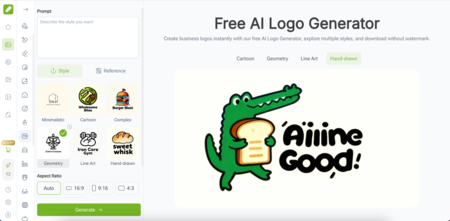
AI Logo Generator on VisualGPT)
To give a clearer picture, here’s how VisualGPT scored across my standard design benchmarks (rated from a professional perspective):
1. Visual Geometry Accuracy
Score: 8.7/10
Surprisingly precise. Minimal distortion. Clean symmetry.
2. Typography Structure
Score: 8.4/10
Consistent spacing and layout. Better than most AI tools.
3. Scalability & Resolution
Score: 9.2/10
4K output is a massive advantage. Suitable for prints and signage.
4. Style Diversity
Score: 8.9/10
Preset templates cover distinct creative directions that designers actually use.
5. Designer Workflow Compatibility
Score: 8.6/10
Output is easy to refine in vector tools. Ideal for early-stage drafts.
6. Brand Identity Coherence
Score: 8.3/10
Symbols and typography feel connected, not randomly paired.
7. Ease of Use
Score: 9.5/10
No registration, instant generation—perfect for fast iteration.
Overall benchmark average: 8.8/10, which is excellent for an AI logo generator.
Where VisualGPT Fits Into a Professional Designer’s Workflow
1. Early Concept Exploration
Instead of spending hours sketching early ideas, VisualGPT helps me:
- explore different shapes
- test brand moods
- generate multiple directions
- validate thematic options
It compresses the “phase 1 ideation stage” into minutes instead of days.
2. Client Presentation Drafts
Clients love options.
VisualGPT allows me to generate:
- several unique concepts
- variations of each direction
- color style alternatives
- symbol and typography combinations
These drafts help clients visualize possibilities quickly.
3. Style Benchmarking
When I need to compare:
- minimalist vs bold
- geometric vs abstract
- flat vs gradient
VisualGPT gives me immediate comparisons to guide the direction.
4. Logo Refinement Process
Although AI outputs are raster images, the clarity of 4K files makes them easy to:
- trace
- vectorize
- polish
- customize
This turns raw AI concepts into real, scalable brand identities.
What Makes VisualGPT Worth Recommending to Other Designers
Based on my benchmarks, here are the strongest reasons professional designers should consider using VisualGPT’s AI Logo Generator:
- It accelerates early ideation.
- It produces cleaner geometry than most AI tools.
- It generates logos that feel intentional and usable.
- It exports in multiple high resolutions.
- It allows rapid style comparison for client presentations.
- It requires no signup, which is ideal for quick workflows.
- It offers preset templates that reflect real creative directions.
This isn’t a toy—it’s a practical tool for modern designers.
FAQ – From a Professional Designer’s Perspective
Is VisualGPT good enough for final logos?
Surprisingly, yes. Several generated logos required minimal refinement.
Can it replace a human designer?
No. But it significantly accelerates exploration and early drafts.
Does it work for real client projects?
Absolutely. Especially for concept development, variation testing, and mood exploration.
Are the outputs vector files?
Outputs are high-quality raster images (1K–4K). They are easy to vectorize with designer tools.
Is it worth using regularly as a designer?
Yes. It saves time and offers genuinely useful inspiration.
Final Professional Verdict
After running a full benchmark test, I can confidently say:
VisualGPT’s AI Logo Generator is one of the most designer-friendly AI logo tools available today.
It combines:
- high-quality geometry
- strong structure
- clean typography
- diverse styles
- 4K export
- no registration requirements
For professional logo designers, brand strategists, creative directors, and agency teams, VisualGPT AI Logo Generator (https://visualgpt.io/ai-logo-generator) serves as an incredibly efficient ideation tool that fits naturally into real design workflows.